في خطوة تاريخية طال انتظارها لسنوات، فجرت منصة «واتساب» مفاجأة من العيار الثقيل، وأطلقت ميزتها الثورية الجديدة التي تتيح للمستخدمين حجز اسم مستخدم (Username) فريد وخاص بهم.
هذا التحديث يغير قواعد اللعبة تماماً، إذ يتيح لك التواصل ومشاركة حسابك مع أي شخص جديد (زميل عمل، جار، أو بائع) دون الحاجة للكشف عن رقم هاتفك الشخصي، مما يحمي خصوصيتك وأرقامك المرتبطة بحساباتك البنكية وهويتك الرسمية.
احجز اسمك قبل أن يأخذه غيرك
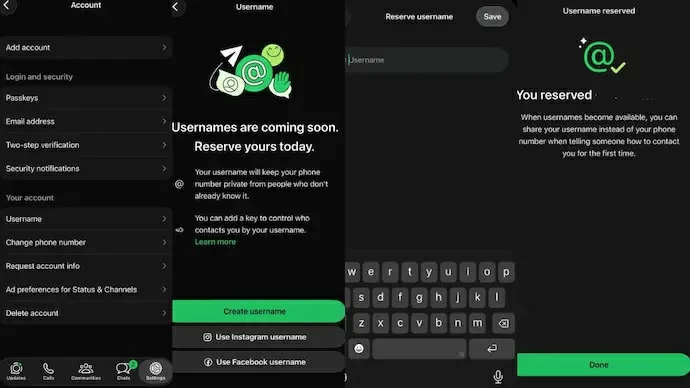
بدأت الميزة في الظهور تدريجياً، وبمجرد وصول الإشعار إلى هاتفك، سارع بحجز اسمك المفضل عبر الخطوات التالية:
- انتقل إلى الإعدادات (Settings) في التطبيق.
- اضغط على الحساب (Account).
- اختر اسم المستخدم (Username) واكتب الاسم الخاص بك.
وتتمحور شروط وآلية عمل الميزة الجديدة في:
- حجم الاسم: يجب أن يراوح الاسم بين 3 و35 حرفاً (احرص على أن يكون مميزاً وسهلاً).
- الأمان الإضافي (مفتاح الاسم): وفرت واتساب ميزة «Username Key»، وهو رمز سري تمنحه لمن تريد فقط، ودونه لن يتمكن أي شخص من مراسلتك حتى لو خمن اسم حسابك!
- منع الانتحال: قامت شركة «ميتا» بحجز أسماء المشاهير والشركات مسبقاً، وتتيح لصناع المحتوى توحيد أسمائهم مع حسابات «فيسبوك» و«إنستغرام».
- إخفاء البحث: لن تكون هذه الأسماء قابلة للبحث العام داخل التطبيق، ولن يصل إليك إلا من تشارك معه اسمك يدوياً.
يذكر أن رقم الهاتف سيبقى شرطاً أساسياً لإنشاء الحساب لأول مرة وتأكيده، لكنه سيتوارى عن الأنظار تماماً أثناء المحادثات اليومية مع الآخرين. ولو أردت الاستفادة من هذه الميزة، فلا تنتظر وقم بتفعيلها فوراً!
In a long-awaited historic step, the "WhatsApp" platform has made a major announcement, launching its new revolutionary feature that allows users to reserve a unique and personal username.
This update completely changes the game, as it enables you to communicate and share your account with anyone new (a coworker, neighbor, or seller) without having to disclose your personal phone number, thus protecting your privacy and the numbers associated with your bank accounts and official identity.
Reserve your name before someone else takes it
The feature has started to roll out gradually, and as soon as the notification reaches your phone, hurry to reserve your preferred name by following these steps:
- Go to the settings in the app.
- Tap on account.
- Select username and enter your desired name.
The conditions and mechanism of the new feature revolve around:
- Name size: The name must be between 3 and 35 characters (make sure it is distinctive and easy).
- Additional security (name key): WhatsApp has provided the "Username Key" feature, which is a secret code you give only to those you want, and without it, no one can message you even if they guess your account name!
- Impersonation prevention: Meta has reserved the names of celebrities and companies in advance, allowing content creators to unify their names with their Facebook and Instagram accounts.
- Search concealment: These names will not be publicly searchable within the app, and only those you manually share your name with will be able to reach you.
It is worth noting that the phone number will remain a fundamental requirement for creating and verifying the account for the first time, but it will be completely hidden during daily conversations with others. If you want to take advantage of this feature, don’t wait and activate it immediately!