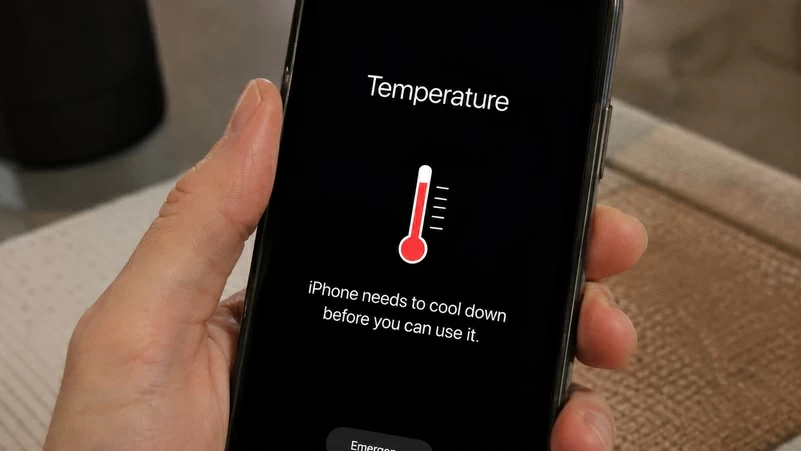
مع موجات الحر الشديدة التي تستمر لأسابيع، تتحول هواتف أندرويد إلى أجهزة شديدة السخونة قد تتوقف عن العمل فجأة أو تتعرض لتلف دائم في بطاريتها. وبينما يظن مستخدمون أن الأزمة تكمن فقط في الطقس الخارجي، كشف تقرير متخصص لموقع «أندرويد بوليس» أن بعض سلوكياتنا اليومية البسيطة تعمل كـ«حاضنة حرارية» تضاعف الأزمة دون أن ندري.
ولتجنب التعطل المفاجئ أو تلف الأجزاء الداخلية، ينبغي التوقف فوراً عن ممارسة الأخطاء التالية:
- إبقاء جراب الهاتف (السترة الصوفية): استخدام حافظات السيليكون أو مادة TPU السميكة يشبه وضع جهازك داخل سترة صوفية، إذ تحبس هذه المواد العازلة الحرارة الناجمة عن العمليات الداخلية وتقيد قدرة الهاتف الطبيعية على التبريد وتبديد السخونة.
- ترك ميزات الطاقة العالية طليقة: تنشيط ميزات مثل نقطة الاتصال (الهوت سبوت) أو الشاشة الدائمة (Always-on Display) وشبكات 5G يضاعف استهلاك الطاقة. ولذا يُنصح بخفض معدل تحديث الشاشة وتقليل السطوع، إلى جانب الاعتماد على شبكات 4G وتقنية Bluetooth LE الموفرة.
- الإصرار على الشحن السريع: عملية الشحن تحول جزءاً كبيراً من الطاقة إلى حرارة هائلة، وتتضاعف هذه السخونة عند استخدام الشواحن السريعة عالية القدرة، مما يجعل الشحن الأبطأ خلال الأجواء الحارة الخيار الآمن لحماية البطارية.
عند ملاحظة ارتفاع حرارة جهازك بشكل مقلق، يفضل اتخاذ خطوات سريعة للحد من خطر التلف:
- انزع الحافظة: قم بإزالة غطاء الهاتف (الجراب) فوراً لفتح مسارات التبريد الطبيعية للظهر المعدني أو الزجاجي.
- أغلق الاتصالات المكثفة: أوقف ميزة نقطة الاتصال (Hotspot) والبلوتوث والواي فاي، وقم بالتحويل مؤقتاً لشبكات الجيل الرابع 4G.
- افصل الشاحن فوراً: افصل الهاتف عن مصدر الكهرباء وأوقف أي عمليات شحن حتى يبرد الجهاز تماماً.
With the extreme heat waves lasting for weeks, Android phones can turn into extremely hot devices that may suddenly stop working or suffer permanent damage to their batteries. While users think the crisis lies only in the external weather, a specialized report from "Android Police" revealed that some of our simple daily behaviors act as a "thermal incubator," exacerbating the crisis without us realizing it.
To avoid sudden failures or damage to internal components, you should immediately stop making the following mistakes:
- Keeping the phone case (the wool sweater): Using silicone cases or thick TPU material is like putting your device inside a wool sweater, as these insulating materials trap the heat generated by internal processes and restrict the phone's natural ability to cool down and dissipate heat.
- Leaving high-power features on: Activating features like hotspot or Always-on Display and 5G networks doubles energy consumption. Therefore, it is advised to reduce the screen refresh rate and lower the brightness, along with relying on 4G networks and energy-saving Bluetooth LE technology.
- Persisting with fast charging: The charging process converts a large portion of energy into massive heat, and this heat is amplified when using high-power fast chargers, making slower charging during hot weather the safer option to protect the battery.
When you notice your device overheating alarmingly, it is preferable to take quick steps to reduce the risk of damage:
- Remove the case: Take off the phone cover immediately to open up the natural cooling pathways for the metal or glass back.
- Shut down intensive connections: Turn off the hotspot feature, Bluetooth, and Wi-Fi, and temporarily switch to 4G networks.
- Unplug the charger immediately: Disconnect the phone from the power source and stop any charging until the device cools down completely.